
732 lines
22 KiB
Markdown
732 lines
22 KiB
Markdown
<p align="center">
|
||
<img src="//mars3d.cn/logo.png" width="300px" />
|
||
</p>
|
||
|
||
<p align="center">基于Vue3.x技术栈的 Mars3D🌎基础项目系统</p>
|
||
|
||
<p align="center">
|
||
<a target="_black" href="https://www.npmjs.com/package/mars3d">
|
||
<img alt="Npm version" src="https://img.shields.io/npm/v/mars3d.svg?style=flat&logo=npm&label=版本号" />
|
||
</a>
|
||
<a target="_black" href="https://www.npmjs.com/package/mars3d">
|
||
<img alt="Npm downloads" src="https://img.shields.io/npm/dt/mars3d?style=flat&logo=npm&label=下载量" />
|
||
</a>
|
||
<a target="_black" href="https://github.com/marsgis/mars3d">
|
||
<img alt="GitHub stars" src="https://img.shields.io/github/stars/marsgis/mars3d?style=flat&logo=github" />
|
||
</a>
|
||
<a target="_black" href="https://gitee.com/marsgis/mars3d">
|
||
<img src="https://gitee.com/marsgis/mars3d/badge/star.svg?theme=dark" alt="star" />
|
||
</a>
|
||
</p>
|
||
|
||
## 项目介绍
|
||
|
||
Mars3D 基础项目 是基于[Mars3D 平台](http://mars3d.cn)做的一个应用系统,提供的一个基础项目模版,包含常用基础地图功能,可在该基础项目上快速开发搭建新项目。方便快速搭建三维地图产品,敏捷开发,可复用,支持各种配置,适合各种场景使用。
|
||
|
||
|
||
## 项目特性
|
||
- **最新技术栈**:使用 Vue3/Vite 等前端前沿技术开发
|
||
- **TypeScript**: 应用程序级 JavaScript 的语言
|
||
- **适用于地图场景的widget模块化**: 继续沿用了原生 JS 版本 widget 架构的一些思想,使用 vue 方式实现了各 widget 功能
|
||
|
||
|
||
> 如果您不熟悉Vue,也可以阅读:[基础项目原生JS版](http://mars3d.cn/dev/guide/project/jcxm-es5.html) 、[基础项目React版](http://mars3d.cn/dev/guide/project/jcxm-react.html)
|
||
|
||
|
||
|
||
|
||
## 视频讲解
|
||
|
||
建议先看一遍视频讲解,再实际操作。您可以[新页面查看高清视频](https://www.bilibili.com/video/bv1JF411q7Ut/)
|
||
|
||
|
||
|
||
|
||
|
||
## 下载运行项目
|
||
|
||
### 下载代码
|
||
|
||
- [Github](https://github.com/marsgis/mars3d-vue-project)
|
||
|
||
```
|
||
git clone git@github.com:marsgis/mars3d-vue-project.git
|
||
```
|
||
|
||
- [Gitee](https://gitee.com/marsgis/mars3d-vue-project):国内码云,下载速度快些。
|
||
|
||
```
|
||
git clone git@gitee.com:marsgis/mars3d-vue-project.git
|
||
```
|
||
|
||
### 运行环境
|
||
|
||
- 推荐使用 vscode,安装参考[开发环境搭建教程](/guide/start/env.html)
|
||
- 安装 vscode 插件,推荐安装 volar(并禁用 vetur)、ESlint 、 Prettier
|
||
- 配置 vscode 参数
|
||
|
||
```json
|
||
// setting.json相关配置
|
||
{
|
||
"eslint.format.enable": true,
|
||
"[json]": {
|
||
"editor.defaultFormatter": "esbenp.prettier-vscode"
|
||
},
|
||
"[typescript]": {
|
||
"editor.defaultFormatter": "esbenp.prettier-vscode"
|
||
},
|
||
"[javascript]": {
|
||
"editor.defaultFormatter": "esbenp.prettier-vscode"
|
||
},
|
||
"[html]": {
|
||
"editor.defaultFormatter": "esbenp.prettier-vscode"
|
||
},
|
||
"[vue]": {
|
||
"editor.defaultFormatter": "esbenp.prettier-vscode"
|
||
}
|
||
}
|
||
```
|
||
|
||
### 运行命令
|
||
请将机器Node版本升级到v16及以上版本
|
||
|
||
#### 首次运行前安装依赖
|
||
|
||
```
|
||
npm install
|
||
|
||
//或使用代理
|
||
npm i --registry=http://registry.taobao.org
|
||
```
|
||
|
||
#### 启动开发环境
|
||
|
||
```
|
||
npm run serve
|
||
```
|
||
|
||
#### 编译构建
|
||
|
||
```
|
||
npm run build
|
||
npm run serve:dist //测试dist运行状态
|
||
```
|
||
|
||
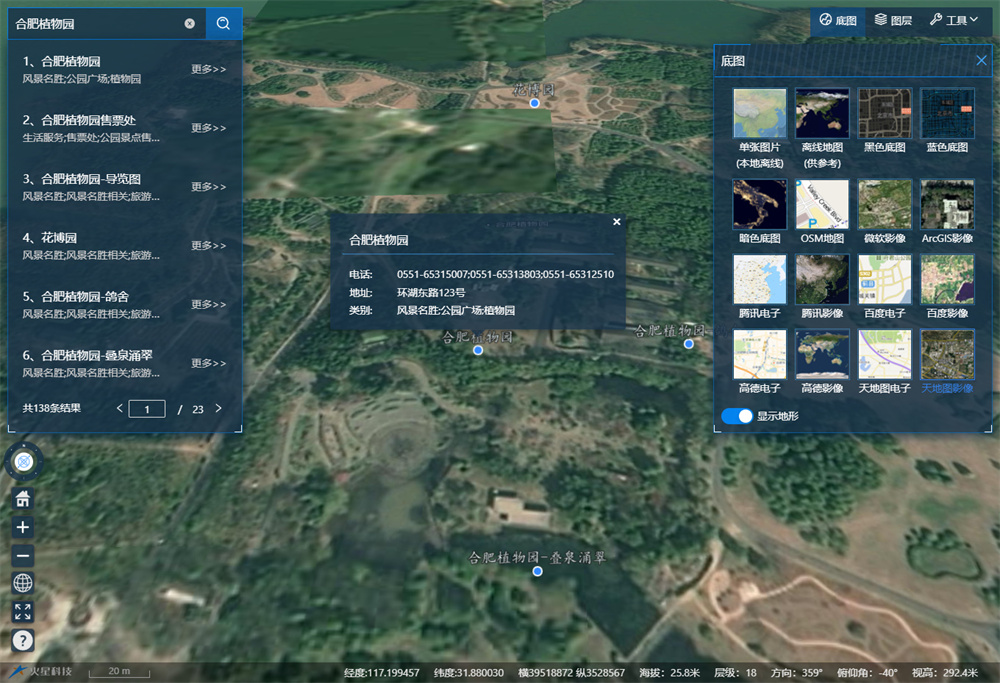
## 运行效果
|
||
|
||
访问[基础项目 Vue 版](http://mars3d.cn/project/vue/index.html) 在线体验效果和功能
|
||
|
||
|
||
|
||
|
||
|
||
## 浏览器支持
|
||
|
||
推荐使用`Chrome 90+` 浏览器, 建议升级浏览器到最新版本访问。
|
||
|
||
| IE | Edge | Firefox | Chrome | Safari |
|
||
| :-: | :-: | :-: | :-: | :-: |
|
||
| not support | last 2 versions | last 2 versions | last 2 versions | last 2 versions |
|
||
|
||
## 如何反馈问题?
|
||
|
||
- 发现您发现项目中存在的问题或者需要优化的地方;
|
||
- 如果您有一些自己全新编写的示例,希望也开源与大家分享。
|
||
|
||
提交方式:
|
||
|
||
- 欢迎在 github 或 gitee 上[提交 PR](https://www.baidu.com/s?wd=在GitHub上提交PR)
|
||
- 如果对 git 不熟悉,也可以整理示例代码发送邮件到 wh@marsgis.cn 由我们来整理集成。
|
||
|
||
## 项目架构
|
||
|
||
### 技术选型
|
||
|
||
- [node](http://nodejs.org/) 和 [git](https://git-scm.com/) :项目开发环境
|
||
- [Vue3](https://v3.cn.vuejs.org/api/):开发框架
|
||
- [Vite](https://vitejs.dev/):开发环境
|
||
- [TypeScript](https://www.tslang.cn/):开发语言
|
||
- [Es6+](http://es6.ruanyifeng.com/) - 熟悉 es6 基本语法
|
||
- [Ant Design Vue](https://next.antdv.com/components/overview-cn/):UI 控件库
|
||
- [ESlint](https://eslint.bootcss.com/):代码检查工具
|
||
- [IconPark](https://iconpark.oceanengine.com/official):UI 图标库
|
||
|
||
> 需要有一定的知识储备,包括 vue3.0 中的 composition Api 模式等,建议浏览下[Web 前端知识视频讲解](https://www.bilibili.com/video/BV1xr4y1U73r/)
|
||
|
||
|
||
### 主要目录说明
|
||
|
||
```
|
||
mars3d-vue-project
|
||
└───src 主要项目代码
|
||
│ └───common 公共核心文件
|
||
│ └───components 公共组件
|
||
│ └───directive 指令
|
||
│ └───misc ts模块定义
|
||
│ └───pages 页面入口
|
||
│ └───utils 工具方法
|
||
│ └───widget 功能相关的widget控件【重要】
|
||
│
|
||
└───public 静态资源
|
||
│ └───config 地图的配置文件等
|
||
│ └───img 图片资源
|
||
│
|
||
│─── .eslintrc.js eslint配置文件
|
||
│─── package.json 项目配置信息
|
||
└─── vite.config.ts vite 配置文件
|
||
└─── tsconfig.js ts 配置文件
|
||
└─── *.html 各页面入口
|
||
```
|
||
|
||
#### 功能主目录
|
||
|
||
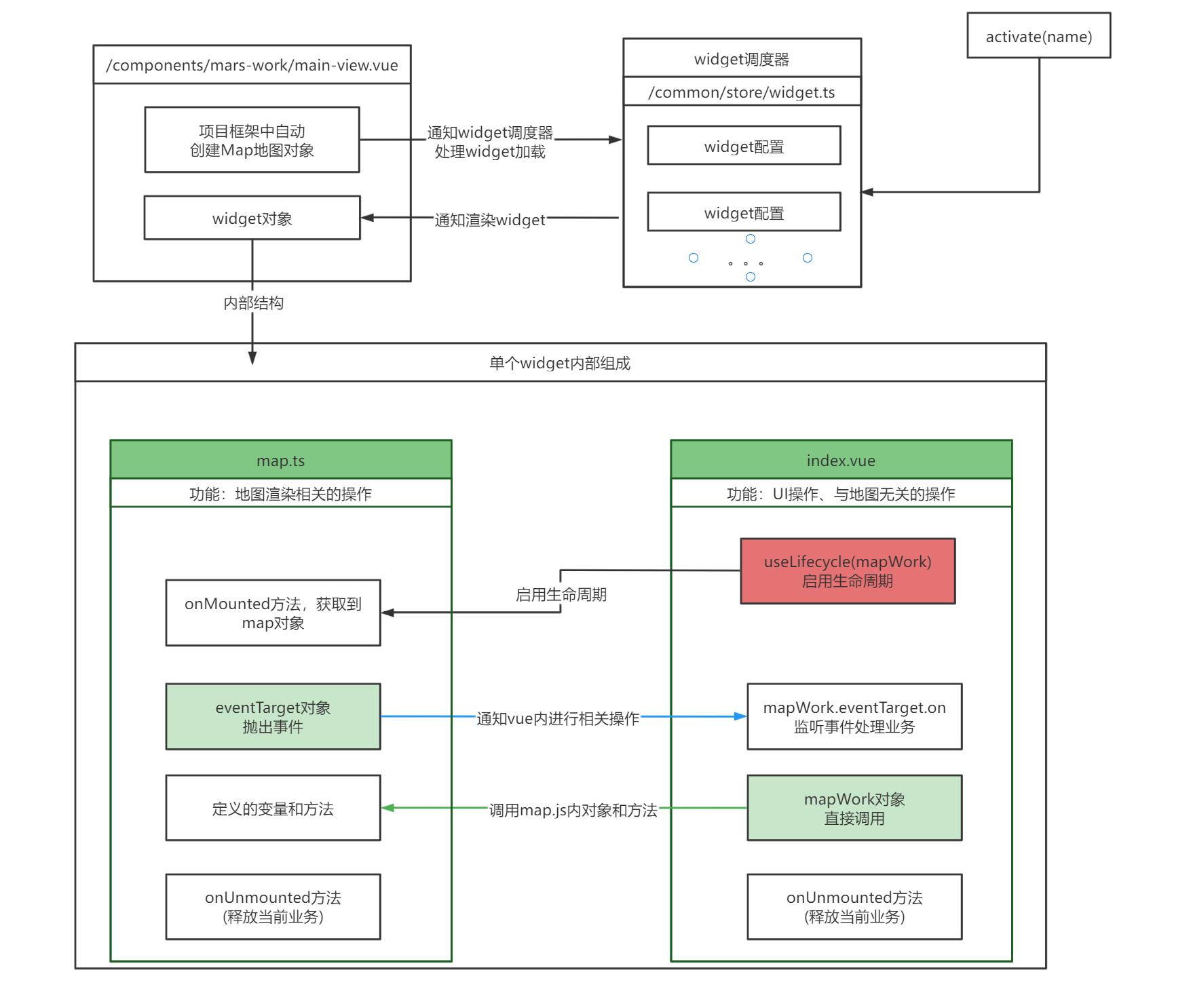
项目所有功能主要在 `src/widgets/*/*`目录下,每一个功能对应了叶子目录下的一个`index.vue`和 `map.ts` 文件,复杂的 widget 目录下也会有相关子组件 `xxx.vue`。
|
||
|
||
vue 下的 widget 设计,沿用了我们 [原生 JS 版基础项目](http://mars3d.cn/dev/guide/project/jcxm-es5.html)的设计理念:
|
||
|
||
- 所有的 widget 都是按需加载
|
||
- 只需要通过简单的配置,即可控制不同业务面板间的互斥关系
|
||
- 提供 api 可以手动的控制面板的显示隐藏
|
||
|
||
#### widget 配置参数
|
||
|
||
widget 加载相关的代码在 `src/common/store/widget.ts`下,使用的 vuex 管理相关状态,默认状态字段有
|
||
|
||
```ts
|
||
// 为 store state 声明类型
|
||
export interface DefaultOption {
|
||
autoDisable?: boolean
|
||
disableOther?: boolean | string[]
|
||
group?: string // group相同的widget一定是互斥的
|
||
meta?: any // 额外参数 不会在每次关闭后清除
|
||
}
|
||
|
||
export interface Widget {
|
||
name: string // 唯一标识
|
||
key?: string // 作为vue diff 环节的key,用于控制组件重载
|
||
component?: any // widget关联的异步组件
|
||
autoDisable?: boolean // 是否能够被自动关闭
|
||
disableOther?: boolean | string[] // 是否自动关闭其他widget,或通过数组指定需要被关闭的widget
|
||
group?: string // group相同的widget一定是互斥的
|
||
visible?: boolean // 显示隐藏
|
||
data?: any // 额外传参 会在每次关闭后清除
|
||
meta?: any // 额外参数 不会在每次关闭后清除
|
||
}
|
||
|
||
export interface WidgetState {
|
||
widgets: Widget[] // widget具体配置
|
||
openAtStart: string[] // 默认加载的widget
|
||
defaultOption?: DefaultOption // 支持配置默认参数
|
||
}
|
||
```
|
||
|
||
### widget 构流程图
|
||
|
||
示例的内部构造处理流程图:
|
||
|
||
|
||
|
||
## 如何增加新的 widget
|
||
|
||
下面我们以 `src/widgets/demo/sample-dialog/` 为示例做讲解
|
||
|
||
### 1.创建示例
|
||
|
||
在 widgets 目录下按项目需要建立好多层目录,比如我们将测试和演示的 widget 放在`src/widgets/demo`目录下面,基础项目的功能放在`src/widgets/basic`目录下。
|
||
|
||
首先建立后 sample-dialog 目录,并参考已有示例新建`index.vue` 和 `map.ts` 2 个文件。
|
||
|
||
#### index.vue
|
||
|
||
index.vue 完整代码为:
|
||
|
||
```vue
|
||
<template>
|
||
<mars-dialog title="弹窗标题" width="300" height="400" top="400" bottom="10" :right="10">
|
||
<a-row :gutter="5">
|
||
<a-col :span="19">
|
||
<mars-input v-model:value="extent" :allowClear="true"></mars-input>
|
||
</a-col>
|
||
<a-col :span="5">
|
||
<a-space size="small">
|
||
<mars-button class="small-btn" @click="onClickDrawExtent">绘制</mars-button>
|
||
</a-space>
|
||
</a-col>
|
||
</a-row>
|
||
<template #icon>
|
||
<bookmark-one theme="outline" size="18" />
|
||
</template>
|
||
</mars-dialog>
|
||
</template>
|
||
|
||
<script setup lang="ts">
|
||
import { onUnmounted, ref } from "vue"
|
||
import useLifecycle from "@mars/common/uses/use-lifecycle"
|
||
import MarsDialog from "@mars/components/mars-work/mars-dialog.vue"
|
||
import * as mapWork from "./map"
|
||
|
||
// 启用map.ts生命周期
|
||
useLifecycle(mapWork)
|
||
|
||
const extent = ref("")
|
||
|
||
// 渲染模型
|
||
const onClickDrawExtent = () => {
|
||
// formState.extent = "测试组件内部数据是否响应"
|
||
mapWork.drawExtent()
|
||
}
|
||
mapWork.eventTarget.on("drawExtent", function (event: any) {
|
||
extent.value = event.extent
|
||
})
|
||
|
||
onUnmounted(() => {
|
||
// 销毁操作
|
||
})
|
||
</script>
|
||
<style lang="less"></style>
|
||
```
|
||
|
||
其中:
|
||
|
||
##### mars-dialog.vue
|
||
|
||
mars-dialog 是弹窗组件,我们 widget 内可以按需选择下面 2 个使用:
|
||
|
||
- mars-dialog 弹框 组件: `src/components/mars-work/mars-dialog.vue`
|
||
|
||
mars-dialog 支持的配置参数包括:
|
||
|
||
```ts
|
||
interface Props {
|
||
warpper?: string // 容器id 默认是app,将作为定位的参照元素,一般不需要修改
|
||
title?: string // 弹框标题
|
||
visible: boolean // 是否显示
|
||
width?: number | string // 初始宽度
|
||
height?: number | string // 初始高度
|
||
left?: number | string // 定位 left值
|
||
right?: number | string // 定位right值
|
||
top?: number | string // 定位top值
|
||
bottom?: number | string // 定位bottom值
|
||
handles?: boolean | string // 缩放控制器 默认 [x, y, xy]
|
||
minWidth?: number // 最小宽度
|
||
minHeight?: number // 最小高度
|
||
maxWidth?: number // 最大宽度
|
||
maxHeight?: number // 最大高度
|
||
zIndex?: number // 层级
|
||
customClass?: string // 自定义class
|
||
}
|
||
```
|
||
|
||
##### 配置 widget 的 props 参数
|
||
|
||
widget 的 prop 参数默认有四中配置方式,默认情况下优先级从低到高分别为 内联 prop、defaultOption 中的 props、meta 中的 props 配置,动态传参,使用方式如下
|
||
|
||
```html
|
||
<!-- 内联 -->
|
||
<mars-dialog title="图上量算" width="300" height="530" top="50"></mars-dialog>
|
||
```
|
||
|
||
```js
|
||
// defaultOption中 注意 必须是meta
|
||
const store: StoreOptions<State> = {
|
||
state: {
|
||
defaultOption: {
|
||
meta: {
|
||
props: {
|
||
top: 110
|
||
}
|
||
}
|
||
},
|
||
widgets: []
|
||
}
|
||
}
|
||
```
|
||
|
||
```js
|
||
// meta中
|
||
widgets = [
|
||
{
|
||
component: markRaw(defineAsyncComponent(() => import("@mars/widgets/hello.vue"))),
|
||
name: "hello",
|
||
autoDisable: true,
|
||
meta: {
|
||
props: {
|
||
top: 70
|
||
}
|
||
}
|
||
}
|
||
]
|
||
```
|
||
|
||
```js
|
||
// 动态传参
|
||
activate({
|
||
name: "hello",
|
||
data: {
|
||
props: {
|
||
top: 70
|
||
}
|
||
}
|
||
})
|
||
```
|
||
|
||
> 以上均为默认情况下的处理,再某些特殊情况下,可以在 widget 中通过下面这种方式,强制将内联 props 的优先级提升到最高
|
||
|
||
```html
|
||
<mars-dialog v-bind="attrs" title="hello" width="300" height="530" top="50" :right="10" :min-width="297"></mars-dialog>
|
||
|
||
<script>
|
||
import { useAttrs } from "vue"
|
||
const attrs = useAttrs()
|
||
</script>
|
||
```
|
||
|
||
##### useLifecycle
|
||
|
||
vue 中需要调用地图方法时,需得启用 map.ts 的生命周期,并且在 map.ts 生命周期中获取 map 对象。
|
||
|
||
```js
|
||
// vue中
|
||
import useLifecycle from "@mars/common/uses/use-lifecycle"
|
||
import * as mapWork from "./map"
|
||
|
||
// 启用map.ts生命周期
|
||
useLifecycle(mapWork)
|
||
```
|
||
|
||
> 注意:
|
||
>
|
||
> 1. 开启生命周期的操作只需要在 index.vue 中执行,子组件不需要
|
||
> 2. 尽量不要在 vue 的生命周期中操作 map,或者调用 map.ts 中操作 map 的函数,此时操作不能保证 map 存在
|
||
|
||
#### map.ts
|
||
|
||
map.ts 完整代码为:
|
||
|
||
```ts
|
||
import * as mars3d from "mars3d"
|
||
|
||
export let map: mars3d.Map // 地图对象
|
||
|
||
// 事件对象,用于抛出事件给vue
|
||
export const eventTarget = new mars3d.BaseClass()
|
||
|
||
// 初始化当前业务
|
||
export function onMounted(mapInstance: mars3d.Map): void {
|
||
map = mapInstance // 记录map
|
||
}
|
||
|
||
// 释放当前业务
|
||
export function onUnmounted(): void {
|
||
map = null
|
||
}
|
||
|
||
// 绘制矩形(演示map.js与index.vue的交互)
|
||
export function drawExtent(): void {
|
||
map.graphicLayer.clear()
|
||
// 绘制矩形
|
||
map.graphicLayer.startDraw({
|
||
type: "rectangle",
|
||
style: {
|
||
fill: true,
|
||
color: "rgba(255,255,0,0.2)",
|
||
outline: true,
|
||
outlineWidth: 2,
|
||
outlineColor: "rgba(255,255,0,1)"
|
||
},
|
||
success: function (graphic: mars3d.graphic.RectangleEntity) {
|
||
const rectangle = graphic.getRectangle({ isFormat: true })
|
||
eventTarget.fire("drawExtent", { extent: JSON.stringify(rectangle) }) // 抛出事件,可以vue中去监听事件
|
||
}
|
||
})
|
||
}
|
||
```
|
||
|
||
其中:
|
||
|
||
##### onMounted
|
||
|
||
初始化当前地图业务的钩子方法,可以通过 onMounted 函数的获取到 map 主对象。
|
||
|
||
```js
|
||
export function onMounted(mapInstance: mars3d.Map): void {
|
||
map = mapInstance // 记录map 初始化当前业务
|
||
}
|
||
```
|
||
|
||
如果未调用,请请参考之前的步骤,检查是否正常使用`useLifecycle(mapWork)`启用生命周期
|
||
|
||
##### onUnmounted
|
||
|
||
释放当前地图业务的钩子方法,
|
||
一般在 onMounted 添加的图层、绑定的事件,在 onUnmounted 中都需要做相反的移除、解绑等操作。
|
||
|
||
```js
|
||
export function onUnmounted(): void {
|
||
map = null // 释放当前业务
|
||
}
|
||
```
|
||
|
||
#### `map.ts`和`index.vue`各自代码业务分离的原则
|
||
|
||
- 涉及地图业务的操作均写在 map.ts 中
|
||
- 涉及 UI 层面、和地图无关的操作均写在 index.vue 中,vue 中尽量不使用 mars3d 和 Cesium 开头的类
|
||
|
||
#### index.vue 与 map.ts 交互
|
||
|
||
1. index.vue 直接调用 map.ts 中 导出的函数或对象
|
||
2. index.vue 调用 map.ts 中的函数拿到返回值,继续后续处理,异步操作返回值可以是 Promise
|
||
3. map.ts 主动触发 ui 变化,通过 mars3d.BaseClass 事件中心处理。如
|
||
|
||
```ts
|
||
// map.ts
|
||
export const eventTarget = new mars3d.BaseClass()
|
||
|
||
function change() {
|
||
mapWork.eventTarget.fire("change", { value: "hello change" })
|
||
}
|
||
|
||
// index.vue
|
||
import * as mapWork from "./map"
|
||
const change = (e: any) => {
|
||
console.log(e)
|
||
}
|
||
mapWork.eventTarget.on("change", change)
|
||
|
||
onUnmounted(() => {
|
||
mapWork.eventTarget.off("change", change) // 注意:请及时销毁事件绑定
|
||
})
|
||
```
|
||
|
||
### 2.相关页面加入菜单入口
|
||
|
||
#### store.ts 清单配置
|
||
|
||
在对应 page 页面下的 `src/pages/demo/widget-store.ts` 中,需要配置刚才新建的 widget 相关信息;
|
||
|
||
```js
|
||
import { defineAsyncComponent, markRaw } from "vue"
|
||
import { WidgetState } from "@mars/common/store/widget"
|
||
import { StoreOptions } from "vuex"
|
||
|
||
const store: StoreOptions<WidgetState> = {
|
||
state: {
|
||
//已忽略其他配置
|
||
widgets: [
|
||
{
|
||
component: markRaw(defineAsyncComponent(() => import("@mars/widgets/demo/sample-dialog/index.vue"))),
|
||
name: "sample-dialog"
|
||
}
|
||
]
|
||
}
|
||
}
|
||
export default store
|
||
```
|
||
|
||
> 其中 state 下的配置参数参考 `widget 配置参数`
|
||
|
||
> 更多参数建议阅读源码的 `src/common/store/widget.ts` (教程可能滞后,请参考源码注释为准)
|
||
|
||
#### 菜单或其他入口文件中
|
||
|
||
在需要的菜单单击事件或其他对象触发代码中,加入`activate('sample-dialog')`来激活我们刚加入的控件,
|
||
|
||
下面已目录为例:
|
||
|
||
在`widgets/demo/menu/index.vue`中加入“弹窗示例”按钮,按钮单击事件调用对应方法,
|
||
|
||
activate 和 disable 函数支持 string(直接传递 name) 和 Widget(传递 widget 对象,将会合并传递的属性,必须包含 name 字段) 类型的参数,上述 name 字段与 store.ts 中的 name 需要一致。
|
||
|
||
```vue
|
||
<template>
|
||
<mars-dialog :draggable="false">
|
||
<a-space>
|
||
<mars-button @click="show('sample-pannel')">面板示例</mars-button>
|
||
<mars-button @click="show('sample-dialog')">弹窗示例</mars-button>
|
||
<mars-button @click="show('ui')">UI面板</mars-button>
|
||
</a-space>
|
||
</mars-dialog>
|
||
</template>
|
||
|
||
<script setup lang="ts">
|
||
import MarsDialog from "@mars/components/mars-work/mars-dialog.vue"
|
||
import { useWidget } from "@mars/common/store/widget"
|
||
|
||
const { activate } = useWidget()
|
||
|
||
const show = (name: string) => {
|
||
activate(name)
|
||
// 或
|
||
activate({
|
||
name
|
||
})
|
||
}
|
||
</script>
|
||
<style lang="less"></style>
|
||
```
|
||
|
||
## 将当前项目集成到自己的项目中(合并 2 个项目)
|
||
|
||
可以参考已集成好的mars3d-vue-project-admin项目:
|
||
[github:vue-mars3d-admin](https://github.com/marsgis/mars3d-vue-project-admin)、
|
||
[gitee:vue-mars3d-admin](https://gitee.com/marsgis/mars3d-vue-project-admin)
|
||
|
||
> 前提条件:需要 2 个项目的技术栈基本是一致的,比如`vue3+ts+ant-design-vue`等
|
||
|
||
|
||
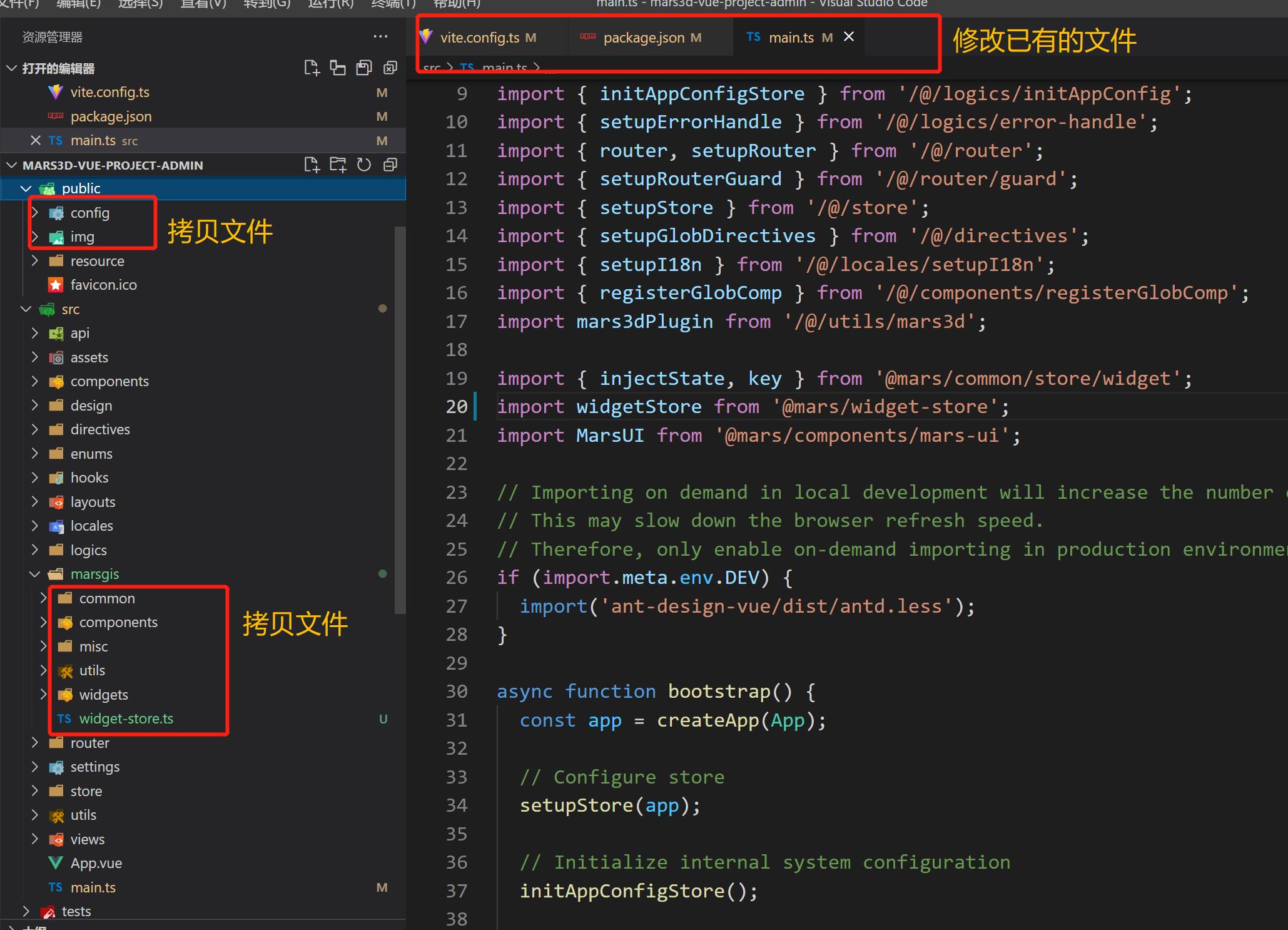
### 流程概览:
|
||
|
||
需要拷贝的目录和文件:
|
||
|
||
- `/src/` 拷贝到 `/src/marsgis`
|
||
- `/public/` 拷贝到 `/public/`
|
||
- `/src/pages/index/widget-store.ts` 拷贝到`/src/marsgis/widget-store.ts`
|
||
|
||
需要修改自己项目的文件:
|
||
|
||
- `package.json`
|
||
- `vite.config.ts` 或 `vue.config.js`
|
||
- `src/main.js`
|
||
- 需要加地图的`vue文件`
|
||
|
||
|
||
|
||
### 1. 拷贝基础项目 src 代码
|
||
|
||
在原有项目中新建目录`src/marsgis`,将基础项目 src 代码拷贝到`src/marsgis`目录下面,其中 pages 目录非必须,可以按需拷贝。
|
||
|
||
### 2. 拷贝 public 下的资源
|
||
|
||
将基础项目`public`下所有文件拷贝到自己项目的`public`目录下。
|
||
|
||
### 3. package.json 依赖的融合
|
||
|
||
复制 package.json 依赖包,保证依赖存在且版本正确。
|
||
|
||
```json
|
||
// dependencies中添加
|
||
{
|
||
"mars3d": "~3.8.0",
|
||
"mars3d-cesium": "~1.122.0",
|
||
"@turf/turf": "^7.1.0",
|
||
"kml-geojson": "^1.2.0",
|
||
"vue": "^3.2.26",
|
||
"vuex": "^4.0.2",
|
||
"vue-color-kit": "^1.0.5",
|
||
"axios": "^0.23.0",
|
||
"core-js": "^3.6.5",
|
||
"ant-design-vue": "^3.2.5",
|
||
"@icon-park/vue-next": "^1.3.5",
|
||
"nprogress": "^0.2.0",
|
||
"echarts": "^5.2.2",
|
||
"localforage": "^1.10.0"
|
||
}
|
||
```
|
||
|
||
### 4. 修改项目别名等配置
|
||
|
||
修改`vite.config.ts` 或 `vue.config.js` 配置文件中的项目别名配置和 process 相关配置
|
||
|
||
```js
|
||
alias: {
|
||
{
|
||
find: /@mars\//,
|
||
replacement: pathResolve('src/marsgis') + '/',
|
||
}
|
||
}
|
||
|
||
define: {
|
||
'process.env': {
|
||
BASE_URL: '/',
|
||
},
|
||
}
|
||
```
|
||
|
||
### 5. 修改初始化相关依赖
|
||
|
||
将`src/pages/index/widget-store.ts`配置文件拷贝`src/marsgis/widget-store.ts`位置。
|
||
|
||
再在`src/main.js`文件中加载和初始化相关依赖。
|
||
|
||
```js
|
||
import { injectState, key } from "@mars/common/store/widget"
|
||
import widgetStore from "@mars/widget-store"
|
||
import MarsUI from "@mars/components/mars-ui"
|
||
|
||
app.use(MarsUI)
|
||
app.use(injectState(widgetStore), key)
|
||
```
|
||
|
||
### 6.复制对应 vue 页面代码
|
||
|
||
复制对应页面代码到组件中, 例如拷贝 `src/pages/index/App.vue` 代码到自己项目需要展示地图的 vue 文件中。
|
||
|
||
### 7. 合并项目规范等配置信息(可选)
|
||
|
||
如果没有下面文件,可以直接拷贝到自己项目中,
|
||
如果已有对应文件,可以对比参数,按需拷贝相关配置进已有文件中。
|
||
|
||
- 复制`/.editorconfig` 文件到`src/marsgis/`目录下
|
||
- 复制`/.eslintrc.js` 文件到`src/marsgis/`目录下
|
||
- 复制`/.prettierrc` 文件到`src/marsgis/`目录下
|
||
- 修改`/tsconfig.json` 文件
|
||
|
||
> 如果项目中采用的 eslint 标准库与基础项目不一致,则根据提示安装对应的依赖,相关依赖如下, 按照项目实际情况安装,并作相应调整.
|
||
|
||
|
||
### 8. 处理样式冲突
|
||
|
||
基础项目已经基本保证不会影响外部样式,此处要处理的是您项目中的全局样式对 mars3d 相关组件的影响。修改相关 CSS 保证基础项目功能 UI 正常即可。
|
||
|
||
## 开发中常见问题
|
||
|
||
|
||
### 1. 如何切换mars3d到授权版
|
||
|
||
参考 [获取Mars3D](http://mars3d.cn/dev/guide/start/download.html)中“从 Mars3D官网 下载获取”章节介绍。
|
||
|
||
流程大概是:
|
||
- 配置后,无需改动源码,在项目代码中使用时与使用npm包是一样的方式,如 `import * as mars3d from "mars3d";`
|
||
- 将 npm 安装后的`node_modules/mars3d/`下的所有文件拷贝一份放在`packages/mars3d/`目录。
|
||
- 将`mars3d-sdk.rar`离线包内文件 覆盖至`packages/mars3d/dist/`目录下。
|
||
- 修改`package.json`中mars3d包配置为:` "mars3d": "file:packages/mars3d",`
|
||
|
||

|
||
|
||
|
||
### 2. 局域网离线使用时注意事项
|
||
|
||
平台所有代码层面来说支持离线运行和使用的,但需要注意的是离线时的地图服务的相关处理。
|
||
|
||
如果局域网内有相关地形、卫星底图服务可以按内网服务类型和 URL 地址替换下`config.json`或`构造Map的代码中`的默认地形和底图。
|
||
|
||
如果局域网内没有相关服务,可以按下面处理:
|
||
|
||
- 修改 config.json 中`terrain`配置中,将已有的`"show": true`配置,改为`"show": false`
|
||
- 修改 config.json 中`basemaps`数组配置中,将已有的`"show": true`的图层,将该值改为`"show": false` ,并将单张图片或离线地图加上`"show": true`,并修改相关 URL 地址。
|
||
- 您也可以参考教程[发布三维数据服务](http://mars3d.cn/dev/guide/data/server.html)进行部署离线地图服务,里面也有一些示例离线数据。
|
||
|
||
## Mars3D 是什么
|
||
|
||
> `Mars3D平台` 是[火星科技](http://marsgis.cn/)研发的一款基于 WebGL 技术实现的三维客户端开发平台,基于[Cesium](https://cesium.com/cesiumjs/)优化提升与 B/S 架构设计,支持多行业扩展的轻量级高效能 GIS 开发平台,能够免安装、无插件地在浏览器中高效运行,并可快速接入与使用多种 GIS 数据和三维模型,呈现三维空间的可视化,完成平台在不同行业的灵活应用。
|
||
|
||
> Mars3D 平台可用于构建无插件、跨操作系统、 跨浏览器的三维 GIS 应用程序。平台使用 WebGL 来进行硬件加速图形化,跨平台、跨浏览器来实现真正的动态大数据三维可视化。通过 Mars3D 产品可快速实现浏览器和移动端上美观、流畅的三维地图呈现与空间分析。
|
||
|
||
### 相关网站
|
||
|
||
- Mars3D 官网:[http://mars3d.cn](http://mars3d.cn)
|
||
|
||
- Mars3D 开源项目列表:[https://github.com/marsgis/mars3d](https://github.com/marsgis/mars3d)
|
||
|
||
## 版权说明
|
||
|
||
1. Mars3D 平台由[火星科技](http://marsgis.cn/)自主研发,拥有所有权利。
|
||
2. 任何个人或组织可以在遵守相关要求下可以免费无限制使用。
|
||
|
||
##发布前config
|
||
"terrain": {
|
||
"url": "/3d/terrain",
|
||
"show":true
|
||
}
|
||
|